Sabtu, 04 Agustus 2012

10 World's Hottest Chilli

You like spicy foods?? You may know the hottest chilli in the world ..
Let's see this article :)

please forgive if there are less words in the English language I chose English because it has many articles on this Indonesian language, so enjoy this article.


10. Bell pepper

Scoville rating: 0
Bell pepper is usually found in four colors, namely red, yellow, green, orange. Bell Pepper sometimes grouped into a less spicy chili, or "sweet peppers". But there are rare white pepper and violet, depending on where they planted and what varieties of them. Green pepper taste is more bitter than the red peppers, yellow or orange.


9. Pimento

Scoville rating: 100-500
Pimento peppers or chili cherry is a large, red heart-shaped, the length between 7-10 cm 5-7 cm wide. Including sweet flesh, juicy and more flavorful than the red peppers. However the several varieties of Pimento is quite spicy. Pimento or pimentão itself is a Portuguese language from the "bell pepper".


8. Anaheim Pepper

Scoville rating: 500-2500
Anaheim's name is actually the name of a region. The name was given because there is a farmer named Emilio Ortega brought these seeds to the Anaheim peppers at the beginning of 1900. Other designations are the California Chile or Magdalena. This chilli varieties grown in New Mexico has a higher level of spiciness, which is about 4500 to 5000 Scoville units.


7. Jalapeño

Scoville rating: 2500-8000
Rich eggplant shape, but it's not eggplant, jalapeno chili's. This has included hot chili, and it can give a burning sensation when eaten (spicy). This chili length of 5-9 cm. Chilli is from Mexico. In Mexico there is an area of ​​160 sq km which is only used for this type of pepper plant! Region, especially in the valley of the river Papaloapan, north of Veracruz.


6. Serrano Pepper
Scoville rating: 10000-23000
Chilli is also from Mexico, in the mountains of Mexico. Taste spicy bite, more spicy than a jalapeno, and usually eaten raw - raw. Its form is similar to cayenne pepper from Indonesia, but this is a different species.


5. Cayenne pepper

Scoville rating: 30000-50000
Red Chillies! Really shows the chilli peppers her through the color. It's called Cayenne Chilli Pepper, or Guinea, or Bird Pepper. This chili is a spicy red pepper, used for cooking or for medical purposes. Its name comes from the city of Cayenne in French Guiana. Chillies are used to spicy dishes, either in whole or powder form. Even the chili is also used for herbal.


4. Thai Pepper
Scoville rating: 50000-100000
Thai Pepper in Indonesian. Cabe Rawit, Sunda. Cengek, Thailand Thai. KHI phrik พริก ขี้หนู nu, Tagalog. siling labuyo. This chili is widely available in Thailand and its neighbors such as Cambodia, Vietnam, Indonesia, and surrounding areas. It turned out that the Indonesia's strong spicy, chili evidence that the usual "eat" every day it was in the fourth.


3. Habanero pepper
Scoville rating: 100000-350000
This chili pepper is one of the most scathing in its genus, the capsicum. When the green raw, when ripe orange or red color. But sometimes looks too white, brown and even pink! Length of about 2-6 cm. This chili came from Yucatan and the area around its shores. Chili's name is derived from the Cuban city, a city in La Habana. Although it is not the place of origin, but the chili is widely sold there.


2. Red Savina Pepper
Scoville rating: 350000-580000
This chili is a special variety of the Habanero pepper, which is bred specifically to have a more spicy chili, large and heavy. Frank Garcia in Walnut, Calif. is the developer of Red Savina chili was. The method is still confidential and not public knowledge. This chili holds the record for hottest chili in the world from 1994 to 2006 and recorded by Guinness World Records. But in February 2007, this chili to step down from his throne, was defeated by the current in one.


1. Bhut Jolokia
Scoville rating: 855000-1050000
Chilli has been confirmed by Guinness World Records as the hottest chili in the world, replacing the Red Savina. This chili came from Assam in northeastern India, this pepper is also grown in Nagaland and Manipur. There is little doubt about the species of this chili, whether entered into the capsicum frutescens or capsicum chinense, but based on DNA tests in mind that this is a hybrid species, with dominant capsicum chinense and capsicum frutescens bit.


so this article I hope you liked this article :)
READ MORE10 World's Hottest Chilli

Kamis, 19 April 2012

Swing Make Over / Swing X

SwingMakeOver merupakan teknik memanipulasi tampilan User Interfaces (Java Swing). Teknik ini dilakukan dengan menggunakan penggambaran agar tampilan komponen-komponen Java Swing seperti TextField, Button dan lain-lain menjadi lebih cantik kelihatannya.

Apa kelebihan SwingX?  SwingX menawarkan fitur-fitur ekstra yang tidak ditemui di Swing secara siap jadi. Sebagai contoh, ada yang disebut sebagai Highlighter, untuk memberi highlight (bisa berupa warna background berbeda dan sebagainya) pada sel tertentu di JXTable, JXList, JXTree, dan sebagainya.  Komponen yang diawali JX kebanyakan adalah turunan dari komponen Swing standar, misalnya JXTable adalah turunan dari JTable.  Demikian juga, JXComboBox adalah turunan dari JComboBoxJXComboBox sudah mendukung fitur highlight dengan adanya fungsi addHighlighter().  Jika kita ingin menampilkan nilai dibawah 50 dengan background merah di JXComboBox, kita dapat menggunakan ColorHighlighter.


Swing MakeOver Part 4, Cool TextField

Ok, sebelumnya coba perhatikan textBox pencarian pada beberapa IE, or Firefox:
IE
Kalo kita perhatikan, ada sesuatu yang menarik pada textbox pencarian diatas, yup benar tektboxnya punya Background, dan Backroundnya akan ilang kalo fokuskan cursot ato kita ketikan sesuatu.

Ya udah kita buat aja, gampang koq
Siapkan sebuah gambar (buat kita jadiin background). Klo saya pake gambar ini:


Sesuaikan ukurannya. (biasanya ukuran standard TextField memunyai tinggi kira-kira 20px) jadi gambarnya kita berikn tinggi kurang lebih 16 px. (Atau sesuaikan saja sesuai keinginan)
Trus, Buat sebuah project baru (Saya pake netbeans). Trus buat class baru. (Saya kasih nama QCoolTextField aja ya).

Kemudian ketikan kode berikut:

package ovq.cooltextfield;

import java.awt.Graphics;
import java.awt.Graphics2D;
import java.awt.RenderingHints;
import java.awt.event.FocusAdapter;
import java.awt.event.FocusEvent;
import java.awt.image.BufferedImage;
import javax.swing.ImageIcon;
import javax.swing.JTextField;

public class QCoolTextField extends JTextField{
private BufferedImage bg;
private boolean fokus = false;

public QCoolTextField() {
bg = QBufferedImage.loadCompatibleImage(new ImageIcon(getClass().getResource("/ovq/cooltextfield/resource/BlackOnta.png")).getImage());

addFocusListener(new FocusAdapter() {

@Override
public void focusGained(FocusEvent e) {
fokus = true;
repaint();
}

@Override
public void focusLost(FocusEvent e) {
fokus = false;
repaint();
}
});
}

@Override
protected void paintComponent(Graphics g) {
Graphics2D g2=(Graphics2D)g.create();
g2.setRenderingHint(RenderingHints.KEY_ANTIALIASING, RenderingHints.VALUE_ANTIALIAS_ON);
super.paintComponent(g);
if ( !fokus && getText().trim().equals("")){
g2.drawImage(bg, 3, 3, null);
}

g2.dispose();
}

}

Perhatikan kode yang di garis bawahi, sesuaikan dengan classpath project dimana gambar disimpan.
Trus compile, klo gak ada error berarti suksess.
Dah gitu buat sebuah JFrame. Drag class QCoolTextField yang baru kita compile. Atur atur posisi sesuai dengan keinginan.
Kurang lebih kayak ginilah:


Trus Compaild n cobain deh.
Hasilnya kira kira kayak gini:

Ok deh cobain, dan ingat ini Cuma contoh, temen temen bisa menggunakannya untuk keperluan yang lain, misalnya indicator pada Form Isian:


Sekian dulu ya Selamat Mencoba :)

sumber :
http://onta-programing.blogspot.com/2009/06/swing-makeover-part-4-cool-textfield.html
READ MORESwing Make Over / Swing X

Kamis, 15 Maret 2012

Project Stream IO

pertama membuat file dengan nama jenisFile.java
isinya :

package project_io;
import java.io.*;
import javax.swing.filechooser.FileFilter;

class jenisFile extends FileFilter {
private String[] s;
jenisFile(String[] sArg) {
s = sArg;
}
// Tentukan file apa yang akan ditampilkan
public boolean accept(File fArg) {
if (fArg.isDirectory())
return true;
for (int i = 0; i < s.length; ++i)
if (fArg.getName().toLowerCase().indexOf(s[i].toLowerCase()) > 0)
return true;
// selain kedua hal di atas, anggap false
return false;
}
public String getDescription() {
String tmp = "";
for (int i = 0; i < s.length; ++i)
tmp += "*" + s[i] + " ";
return tmp;
}
}
// Jika Extension dari file sesuai syarat, tampilkan


kemudian membuat NEW - JFrame Form kalau aku nama filenya ProjectIO.java
tampilannya seperti ini 


setelah itu mulai mengcoding :D


import java.awt.event.ActionEvent;
import java.awt.event.ActionListener;
import java.io.File;
import java.io.FileInputStream;
import java.io.FileWriter;
import java.util.logging.Level;
import java.util.logging.Logger;
import javax.swing.Timer;
import javax.swing.Icon;
import javax.swing.JDialog;
import javax.swing.JFrame;
import javax.swing.filechooser.*;
import javax.swing.*;
import java.io.*;
import java.security.MessageDigest;
import java.security.NoSuchAlgorithmException;
import javax.swing.filechooser.FileFilter;


public class ProjectIO extends javax.swing.JFrame {
    JFileChooser fc;
    File file;
    boolean Nfile;
    final String[] EXT = { ".csv" };
    final String[] EXT2 = { ".txt", ".java" };
    private String text;
    
    public ProjectIO() {
        initComponents();
        editor.setVisible(false);
        editor2.setFocusable(false);
        editor2.setEditable(false);
        this.setTitle("Untitled - NOTES");
        fc = new JFileChooser();
        fc.addChoosableFileFilter(new jenisFile(EXT));
        fc.addChoosableFileFilter(new jenisFile(EXT2));
        fc.setAcceptAllFileFilterUsed(false);
        Nfile = true;
    }


    @SuppressWarnings("unchecked")
    // <editor-fold defaultstate="collapsed" desc="Generated Code">                          
    private void initComponents() {


        jPanel1 = new javax.swing.JPanel();
        jComboBox1 = new javax.swing.JComboBox();
        jPanel3 = new javax.swing.JPanel();
        btnNew = new javax.swing.JButton();
        btnOpen = new javax.swing.JButton();
        btnSave = new javax.swing.JButton();
        btnSaveAs = new javax.swing.JButton();
        jLabel1 = new javax.swing.JLabel();
        txtnamafield = new javax.swing.JTextField();
        jPanel4 = new javax.swing.JPanel();
        txtPass = new javax.swing.JTextField();
        btnClear = new javax.swing.JButton();
        jScrollPane1 = new javax.swing.JScrollPane();
        editor = new javax.swing.JEditorPane();
        jPanel2 = new javax.swing.JPanel();
        jPanel5 = new javax.swing.JPanel();
        txtCPass = new javax.swing.JTextField();
        btnDes = new javax.swing.JButton();
        jPanel8 = new javax.swing.JPanel();
        btnCrypt = new javax.swing.JButton();
        btnMD5 = new javax.swing.JButton();
        btnRC = new javax.swing.JButton();
        btnCC = new javax.swing.JButton();
        spnGeser = new javax.swing.JSpinner();
        btnSave2 = new javax.swing.JButton();
        jScrollPane2 = new javax.swing.JScrollPane();
        editor2 = new javax.swing.JEditorPane();
        btnExit = new javax.swing.JButton();


        setDefaultCloseOperation(javax.swing.WindowConstants.EXIT_ON_CLOSE);


        jPanel1.setBorder(javax.swing.BorderFactory.createTitledBorder(javax.swing.BorderFactory.createLineBorder(new java.awt.Color(0, 0, 204), 2), "First Text", javax.swing.border.TitledBorder.CENTER, javax.swing.border.TitledBorder.DEFAULT_POSITION, new java.awt.Font("Bleeding Cowboys", 0, 14), new java.awt.Color(0, 0, 204))); // NOI18N
        jPanel1.setForeground(new java.awt.Color(255, 153, 204));


        jComboBox1.setFont(new java.awt.Font("Book Antiqua", 0, 12));
        jComboBox1.setModel(new javax.swing.DefaultComboBoxModel(new String[] { "Menu", "New", "Open", "Save", "Save As" }));
        jComboBox1.addActionListener(new java.awt.event.ActionListener() {
            public void actionPerformed(java.awt.event.ActionEvent evt) {
                jComboBox1ActionPerformed(evt);
            }
        });


        jPanel3.setBorder(javax.swing.BorderFactory.createTitledBorder(javax.swing.BorderFactory.createLineBorder(new java.awt.Color(0, 0, 204)), "Menu", javax.swing.border.TitledBorder.DEFAULT_JUSTIFICATION, javax.swing.border.TitledBorder.DEFAULT_POSITION, new java.awt.Font("Bleeding Cowboys", 0, 14), new java.awt.Color(0, 0, 204))); // NOI18N


        btnNew.setFont(new java.awt.Font("Book Antiqua", 0, 12));
        btnNew.setText("New");
        btnNew.addActionListener(new java.awt.event.ActionListener() {
            public void actionPerformed(java.awt.event.ActionEvent evt) {
                btnNewActionPerformed(evt);
            }
        });


        btnOpen.setFont(new java.awt.Font("Book Antiqua", 0, 12));
        btnOpen.setText("Open");
        btnOpen.addActionListener(new java.awt.event.ActionListener() {
            public void actionPerformed(java.awt.event.ActionEvent evt) {
                btnOpenActionPerformed(evt);
            }
        });


        btnSave.setFont(new java.awt.Font("Book Antiqua", 0, 12));
        btnSave.setText("Save");
        btnSave.setEnabled(false);
        btnSave.addActionListener(new java.awt.event.ActionListener() {
            public void actionPerformed(java.awt.event.ActionEvent evt) {
                btnSaveActionPerformed(evt);
            }
        });


        btnSaveAs.setFont(new java.awt.Font("Book Antiqua", 0, 12));
        btnSaveAs.setText("Save As");
        btnSaveAs.setEnabled(false);
        btnSaveAs.addActionListener(new java.awt.event.ActionListener() {
            public void actionPerformed(java.awt.event.ActionEvent evt) {
                btnSaveAsActionPerformed(evt);
            }
        });


        javax.swing.GroupLayout jPanel3Layout = new javax.swing.GroupLayout(jPanel3);
        jPanel3.setLayout(jPanel3Layout);
        jPanel3Layout.setHorizontalGroup(
            jPanel3Layout.createParallelGroup(javax.swing.GroupLayout.Alignment.LEADING)
            .addGroup(jPanel3Layout.createSequentialGroup()
                .addContainerGap()
                .addGroup(jPanel3Layout.createParallelGroup(javax.swing.GroupLayout.Alignment.LEADING, false)
                    .addComponent(btnSave, javax.swing.GroupLayout.DEFAULT_SIZE, javax.swing.GroupLayout.DEFAULT_SIZE, Short.MAX_VALUE)
                    .addComponent(btnNew, javax.swing.GroupLayout.DEFAULT_SIZE, 73, Short.MAX_VALUE))
                .addPreferredGap(javax.swing.LayoutStyle.ComponentPlacement.UNRELATED)
                .addGroup(jPanel3Layout.createParallelGroup(javax.swing.GroupLayout.Alignment.LEADING)
                    .addComponent(btnSaveAs, javax.swing.GroupLayout.DEFAULT_SIZE, javax.swing.GroupLayout.DEFAULT_SIZE, Short.MAX_VALUE)
                    .addComponent(btnOpen, javax.swing.GroupLayout.DEFAULT_SIZE, 75, Short.MAX_VALUE))
                .addContainerGap())
        );
        jPanel3Layout.setVerticalGroup(
            jPanel3Layout.createParallelGroup(javax.swing.GroupLayout.Alignment.LEADING)
            .addGroup(jPanel3Layout.createSequentialGroup()
                .addContainerGap()
                .addGroup(jPanel3Layout.createParallelGroup(javax.swing.GroupLayout.Alignment.BASELINE)
                    .addComponent(btnNew)
                    .addComponent(btnOpen))
                .addPreferredGap(javax.swing.LayoutStyle.ComponentPlacement.RELATED)
                .addGroup(jPanel3Layout.createParallelGroup(javax.swing.GroupLayout.Alignment.BASELINE)
                    .addComponent(btnSave)
                    .addComponent(btnSaveAs))
                .addContainerGap(javax.swing.GroupLayout.DEFAULT_SIZE, Short.MAX_VALUE))
        );


        jLabel1.setFont(new java.awt.Font("Book Antiqua", 0, 12));
        jLabel1.setText("Nama File");


        jPanel4.setBorder(javax.swing.BorderFactory.createTitledBorder(javax.swing.BorderFactory.createLineBorder(new java.awt.Color(0, 0, 204)), "Password", javax.swing.border.TitledBorder.CENTER, javax.swing.border.TitledBorder.DEFAULT_POSITION, new java.awt.Font("Bleeding Cowboys", 0, 14), new java.awt.Color(0, 0, 204))); // NOI18N


        javax.swing.GroupLayout jPanel4Layout = new javax.swing.GroupLayout(jPanel4);
        jPanel4.setLayout(jPanel4Layout);
        jPanel4Layout.setHorizontalGroup(
            jPanel4Layout.createParallelGroup(javax.swing.GroupLayout.Alignment.LEADING)
            .addGroup(jPanel4Layout.createSequentialGroup()
                .addContainerGap()
                .addComponent(txtPass, javax.swing.GroupLayout.DEFAULT_SIZE, 197, Short.MAX_VALUE)
                .addContainerGap())
        );
        jPanel4Layout.setVerticalGroup(
            jPanel4Layout.createParallelGroup(javax.swing.GroupLayout.Alignment.LEADING)
            .addGroup(javax.swing.GroupLayout.Alignment.TRAILING, jPanel4Layout.createSequentialGroup()
                .addContainerGap(javax.swing.GroupLayout.DEFAULT_SIZE, Short.MAX_VALUE)
                .addComponent(txtPass, javax.swing.GroupLayout.PREFERRED_SIZE, javax.swing.GroupLayout.DEFAULT_SIZE, javax.swing.GroupLayout.PREFERRED_SIZE)
                .addContainerGap())
        );


        btnClear.setFont(new java.awt.Font("Book Antiqua", 0, 12)); // NOI18N
        btnClear.setText("Clear Text");
        btnClear.addActionListener(new java.awt.event.ActionListener() {
            public void actionPerformed(java.awt.event.ActionEvent evt) {
                btnClearActionPerformed(evt);
            }
        });


        editor.setEnabled(false);
        jScrollPane1.setViewportView(editor);


        javax.swing.GroupLayout jPanel1Layout = new javax.swing.GroupLayout(jPanel1);
        jPanel1.setLayout(jPanel1Layout);
        jPanel1Layout.setHorizontalGroup(
            jPanel1Layout.createParallelGroup(javax.swing.GroupLayout.Alignment.LEADING)
            .addGroup(jPanel1Layout.createSequentialGroup()
                .addContainerGap()
                .addGroup(jPanel1Layout.createParallelGroup(javax.swing.GroupLayout.Alignment.LEADING)
                    .addGroup(jPanel1Layout.createParallelGroup(javax.swing.GroupLayout.Alignment.LEADING)
                        .addGroup(jPanel1Layout.createSequentialGroup()
                            .addGroup(jPanel1Layout.createParallelGroup(javax.swing.GroupLayout.Alignment.LEADING)
                                .addGroup(jPanel1Layout.createSequentialGroup()
                                    .addComponent(jComboBox1, javax.swing.GroupLayout.PREFERRED_SIZE, javax.swing.GroupLayout.DEFAULT_SIZE, javax.swing.GroupLayout.PREFERRED_SIZE)
                                    .addGap(26, 26, 26)
                                    .addComponent(jPanel3, javax.swing.GroupLayout.PREFERRED_SIZE, javax.swing.GroupLayout.DEFAULT_SIZE, javax.swing.GroupLayout.PREFERRED_SIZE)
                                    .addGap(32, 32, 32)
                                    .addGroup(jPanel1Layout.createParallelGroup(javax.swing.GroupLayout.Alignment.LEADING)
                                        .addComponent(txtnamafield, javax.swing.GroupLayout.DEFAULT_SIZE, 127, Short.MAX_VALUE)
                                        .addComponent(jLabel1)))
                                .addComponent(jScrollPane1, javax.swing.GroupLayout.Alignment.TRAILING, javax.swing.GroupLayout.DEFAULT_SIZE, 442, Short.MAX_VALUE))
                            .addContainerGap())
                        .addGroup(javax.swing.GroupLayout.Alignment.TRAILING, jPanel1Layout.createSequentialGroup()
                            .addComponent(btnClear)
                            .addGap(179, 179, 179)))
                    .addGroup(javax.swing.GroupLayout.Alignment.TRAILING, jPanel1Layout.createSequentialGroup()
                        .addComponent(jPanel4, javax.swing.GroupLayout.PREFERRED_SIZE, javax.swing.GroupLayout.DEFAULT_SIZE, javax.swing.GroupLayout.PREFERRED_SIZE)
                        .addGap(108, 108, 108))))
        );
        jPanel1Layout.setVerticalGroup(
            jPanel1Layout.createParallelGroup(javax.swing.GroupLayout.Alignment.LEADING)
            .addGroup(jPanel1Layout.createSequentialGroup()
                .addGroup(jPanel1Layout.createParallelGroup(javax.swing.GroupLayout.Alignment.LEADING)
                    .addGroup(jPanel1Layout.createSequentialGroup()
                        .addGap(20, 20, 20)
                        .addComponent(jComboBox1, javax.swing.GroupLayout.PREFERRED_SIZE, javax.swing.GroupLayout.DEFAULT_SIZE, javax.swing.GroupLayout.PREFERRED_SIZE))
                    .addGroup(jPanel1Layout.createSequentialGroup()
                        .addContainerGap()
                        .addComponent(jPanel3, javax.swing.GroupLayout.PREFERRED_SIZE, javax.swing.GroupLayout.DEFAULT_SIZE, javax.swing.GroupLayout.PREFERRED_SIZE))
                    .addGroup(jPanel1Layout.createSequentialGroup()
                        .addGap(20, 20, 20)
                        .addComponent(jLabel1)
                        .addGap(9, 9, 9)
                        .addComponent(txtnamafield, javax.swing.GroupLayout.PREFERRED_SIZE, javax.swing.GroupLayout.DEFAULT_SIZE, javax.swing.GroupLayout.PREFERRED_SIZE)))
                .addGap(18, 18, 18)
                .addComponent(jScrollPane1, javax.swing.GroupLayout.PREFERRED_SIZE, 165, javax.swing.GroupLayout.PREFERRED_SIZE)
                .addPreferredGap(javax.swing.LayoutStyle.ComponentPlacement.UNRELATED)
                .addComponent(btnClear)
                .addGap(18, 18, 18)
                .addComponent(jPanel4, javax.swing.GroupLayout.PREFERRED_SIZE, javax.swing.GroupLayout.DEFAULT_SIZE, javax.swing.GroupLayout.PREFERRED_SIZE)
                .addContainerGap(31, Short.MAX_VALUE))
        );


        jPanel2.setBorder(javax.swing.BorderFactory.createTitledBorder(javax.swing.BorderFactory.createLineBorder(new java.awt.Color(0, 0, 204), 2), "Enkripsi Text", javax.swing.border.TitledBorder.CENTER, javax.swing.border.TitledBorder.DEFAULT_POSITION, new java.awt.Font("Bleeding Cowboys", 0, 14), new java.awt.Color(0, 0, 204))); // NOI18N
        jPanel2.setForeground(new java.awt.Color(255, 153, 204));


        jPanel5.setBorder(javax.swing.BorderFactory.createTitledBorder(javax.swing.BorderFactory.createLineBorder(new java.awt.Color(0, 0, 204)), "Password", javax.swing.border.TitledBorder.CENTER, javax.swing.border.TitledBorder.DEFAULT_POSITION, new java.awt.Font("Bleeding Cowboys", 0, 14), new java.awt.Color(0, 0, 204))); // NOI18N


        javax.swing.GroupLayout jPanel5Layout = new javax.swing.GroupLayout(jPanel5);
        jPanel5.setLayout(jPanel5Layout);
        jPanel5Layout.setHorizontalGroup(
            jPanel5Layout.createParallelGroup(javax.swing.GroupLayout.Alignment.LEADING)
            .addGroup(jPanel5Layout.createSequentialGroup()
                .addContainerGap()
                .addComponent(txtCPass, javax.swing.GroupLayout.DEFAULT_SIZE, 197, Short.MAX_VALUE)
                .addContainerGap())
        );
        jPanel5Layout.setVerticalGroup(
            jPanel5Layout.createParallelGroup(javax.swing.GroupLayout.Alignment.LEADING)
            .addGroup(jPanel5Layout.createSequentialGroup()
                .addContainerGap()
                .addComponent(txtCPass, javax.swing.GroupLayout.PREFERRED_SIZE, javax.swing.GroupLayout.DEFAULT_SIZE, javax.swing.GroupLayout.PREFERRED_SIZE)
                .addContainerGap(javax.swing.GroupLayout.DEFAULT_SIZE, Short.MAX_VALUE))
        );


        btnDes.setFont(new java.awt.Font("Book Antiqua", 0, 12)); // NOI18N
        btnDes.setText("Description");
        btnDes.addActionListener(new java.awt.event.ActionListener() {
            public void actionPerformed(java.awt.event.ActionEvent evt) {
                btnDesActionPerformed(evt);
            }
        });


        jPanel8.setBorder(javax.swing.BorderFactory.createTitledBorder(javax.swing.BorderFactory.createLineBorder(new java.awt.Color(0, 0, 204)), "Enkripsi", javax.swing.border.TitledBorder.DEFAULT_JUSTIFICATION, javax.swing.border.TitledBorder.DEFAULT_POSITION, new java.awt.Font("Bleeding Cowboys", 0, 14), new java.awt.Color(0, 0, 255))); // NOI18N


        btnCrypt.setFont(new java.awt.Font("Book Antiqua", 0, 12));
        btnCrypt.setText("Cryptography");
        btnCrypt.addActionListener(new java.awt.event.ActionListener() {
            public void actionPerformed(java.awt.event.ActionEvent evt) {
                btnCryptActionPerformed(evt);
            }
        });


        btnMD5.setFont(new java.awt.Font("Book Antiqua", 0, 12));
        btnMD5.setText("MD5");
        btnMD5.addActionListener(new java.awt.event.ActionListener() {
            public void actionPerformed(java.awt.event.ActionEvent evt) {
                btnMD5ActionPerformed(evt);
            }
        });


        btnRC.setFont(new java.awt.Font("Book Antiqua", 0, 12));
        btnRC.setText("Random Char");
        btnRC.addActionListener(new java.awt.event.ActionListener() {
            public void actionPerformed(java.awt.event.ActionEvent evt) {
                btnRCActionPerformed(evt);
            }
        });


        btnCC.setFont(new java.awt.Font("Book Antiqua", 0, 12));
        btnCC.setText("Caesar Chiper");
        btnCC.addActionListener(new java.awt.event.ActionListener() {
            public void actionPerformed(java.awt.event.ActionEvent evt) {
                btnCCActionPerformed(evt);
            }
        });


        javax.swing.GroupLayout jPanel8Layout = new javax.swing.GroupLayout(jPanel8);
        jPanel8.setLayout(jPanel8Layout);
        jPanel8Layout.setHorizontalGroup(
            jPanel8Layout.createParallelGroup(javax.swing.GroupLayout.Alignment.LEADING)
            .addGroup(jPanel8Layout.createSequentialGroup()
                .addContainerGap()
                .addGroup(jPanel8Layout.createParallelGroup(javax.swing.GroupLayout.Alignment.LEADING, false)
                    .addComponent(btnRC, javax.swing.GroupLayout.Alignment.TRAILING, javax.swing.GroupLayout.DEFAULT_SIZE, javax.swing.GroupLayout.DEFAULT_SIZE, Short.MAX_VALUE)
                    .addComponent(btnCrypt, javax.swing.GroupLayout.Alignment.TRAILING, javax.swing.GroupLayout.DEFAULT_SIZE, javax.swing.GroupLayout.DEFAULT_SIZE, Short.MAX_VALUE))
                .addPreferredGap(javax.swing.LayoutStyle.ComponentPlacement.UNRELATED)
                .addGroup(jPanel8Layout.createParallelGroup(javax.swing.GroupLayout.Alignment.LEADING, false)
                    .addComponent(btnMD5, javax.swing.GroupLayout.DEFAULT_SIZE, javax.swing.GroupLayout.DEFAULT_SIZE, Short.MAX_VALUE)
                    .addComponent(btnCC, javax.swing.GroupLayout.DEFAULT_SIZE, javax.swing.GroupLayout.DEFAULT_SIZE, Short.MAX_VALUE))
                .addContainerGap(javax.swing.GroupLayout.DEFAULT_SIZE, Short.MAX_VALUE))
        );
        jPanel8Layout.setVerticalGroup(
            jPanel8Layout.createParallelGroup(javax.swing.GroupLayout.Alignment.LEADING)
            .addGroup(jPanel8Layout.createSequentialGroup()
                .addContainerGap()
                .addGroup(jPanel8Layout.createParallelGroup(javax.swing.GroupLayout.Alignment.BASELINE)
                    .addComponent(btnCrypt)
                    .addComponent(btnMD5))
                .addPreferredGap(javax.swing.LayoutStyle.ComponentPlacement.RELATED)
                .addGroup(jPanel8Layout.createParallelGroup(javax.swing.GroupLayout.Alignment.BASELINE)
                    .addComponent(btnRC)
                    .addComponent(btnCC))
                .addContainerGap(javax.swing.GroupLayout.DEFAULT_SIZE, Short.MAX_VALUE))
        );


        btnSave2.setFont(new java.awt.Font("Book Antiqua", 0, 12)); // NOI18N
        btnSave2.setText("Save");
        btnSave2.addActionListener(new java.awt.event.ActionListener() {
            public void actionPerformed(java.awt.event.ActionEvent evt) {
                btnSave2ActionPerformed(evt);
            }
        });


        editor2.setEnabled(false);
        jScrollPane2.setViewportView(editor2);


        javax.swing.GroupLayout jPanel2Layout = new javax.swing.GroupLayout(jPanel2);
        jPanel2.setLayout(jPanel2Layout);
        jPanel2Layout.setHorizontalGroup(
            jPanel2Layout.createParallelGroup(javax.swing.GroupLayout.Alignment.LEADING)
            .addGroup(jPanel2Layout.createSequentialGroup()
                .addContainerGap()
                .addGroup(jPanel2Layout.createParallelGroup(javax.swing.GroupLayout.Alignment.LEADING)
                    .addGroup(jPanel2Layout.createSequentialGroup()
                        .addComponent(spnGeser, javax.swing.GroupLayout.PREFERRED_SIZE, 75, javax.swing.GroupLayout.PREFERRED_SIZE)
                        .addGap(18, 18, 18)
                        .addComponent(jPanel8, javax.swing.GroupLayout.PREFERRED_SIZE, javax.swing.GroupLayout.DEFAULT_SIZE, javax.swing.GroupLayout.PREFERRED_SIZE))
                    .addComponent(jScrollPane2, javax.swing.GroupLayout.DEFAULT_SIZE, 442, Short.MAX_VALUE))
                .addContainerGap())
            .addGroup(jPanel2Layout.createSequentialGroup()
                .addGap(106, 106, 106)
                .addGroup(jPanel2Layout.createParallelGroup(javax.swing.GroupLayout.Alignment.LEADING)
                    .addGroup(jPanel2Layout.createSequentialGroup()
                        .addComponent(jPanel5, javax.swing.GroupLayout.PREFERRED_SIZE, javax.swing.GroupLayout.DEFAULT_SIZE, javax.swing.GroupLayout.PREFERRED_SIZE)
                        .addContainerGap())
                    .addGroup(jPanel2Layout.createSequentialGroup()
                        .addComponent(btnDes, javax.swing.GroupLayout.DEFAULT_SIZE, javax.swing.GroupLayout.DEFAULT_SIZE, Short.MAX_VALUE)
                        .addGap(64, 64, 64)
                        .addComponent(btnSave2)
                        .addGap(142, 142, 142))))
        );
        jPanel2Layout.setVerticalGroup(
            jPanel2Layout.createParallelGroup(javax.swing.GroupLayout.Alignment.LEADING)
            .addGroup(jPanel2Layout.createSequentialGroup()
                .addGroup(jPanel2Layout.createParallelGroup(javax.swing.GroupLayout.Alignment.LEADING)
                    .addGroup(jPanel2Layout.createSequentialGroup()
                        .addGap(19, 19, 19)
                        .addComponent(spnGeser, javax.swing.GroupLayout.PREFERRED_SIZE, 32, javax.swing.GroupLayout.PREFERRED_SIZE))
                    .addGroup(jPanel2Layout.createSequentialGroup()
                        .addContainerGap()
                        .addComponent(jPanel8, javax.swing.GroupLayout.PREFERRED_SIZE, javax.swing.GroupLayout.DEFAULT_SIZE, javax.swing.GroupLayout.PREFERRED_SIZE)))
                .addGap(18, 18, 18)
                .addComponent(jScrollPane2, javax.swing.GroupLayout.PREFERRED_SIZE, 165, javax.swing.GroupLayout.PREFERRED_SIZE)
                .addPreferredGap(javax.swing.LayoutStyle.ComponentPlacement.RELATED)
                .addGroup(jPanel2Layout.createParallelGroup(javax.swing.GroupLayout.Alignment.BASELINE)
                    .addComponent(btnDes)
                    .addComponent(btnSave2))
                .addGap(18, 18, 18)
                .addComponent(jPanel5, javax.swing.GroupLayout.PREFERRED_SIZE, javax.swing.GroupLayout.DEFAULT_SIZE, javax.swing.GroupLayout.PREFERRED_SIZE)
                .addContainerGap(36, Short.MAX_VALUE))
        );


        btnExit.setFont(new java.awt.Font("Book Antiqua", 0, 12));
        btnExit.setText("Exit");
        btnExit.addActionListener(new java.awt.event.ActionListener() {
            public void actionPerformed(java.awt.event.ActionEvent evt) {
                btnExitActionPerformed(evt);
            }
        });


        javax.swing.GroupLayout layout = new javax.swing.GroupLayout(getContentPane());
        getContentPane().setLayout(layout);
        layout.setHorizontalGroup(
            layout.createParallelGroup(javax.swing.GroupLayout.Alignment.LEADING)
            .addGroup(layout.createSequentialGroup()
                .addComponent(jPanel1, javax.swing.GroupLayout.PREFERRED_SIZE, javax.swing.GroupLayout.DEFAULT_SIZE, javax.swing.GroupLayout.PREFERRED_SIZE)
                .addGap(28, 28, 28)
                .addComponent(btnExit, javax.swing.GroupLayout.DEFAULT_SIZE, javax.swing.GroupLayout.DEFAULT_SIZE, Short.MAX_VALUE)
                .addGap(18, 18, 18)
                .addComponent(jPanel2, javax.swing.GroupLayout.PREFERRED_SIZE, javax.swing.GroupLayout.DEFAULT_SIZE, javax.swing.GroupLayout.PREFERRED_SIZE)
                .addContainerGap())
        );
        layout.setVerticalGroup(
            layout.createParallelGroup(javax.swing.GroupLayout.Alignment.LEADING)
            .addGroup(layout.createSequentialGroup()
                .addContainerGap()
                .addGroup(layout.createParallelGroup(javax.swing.GroupLayout.Alignment.LEADING)
                    .addGroup(layout.createSequentialGroup()
                        .addComponent(jPanel1, javax.swing.GroupLayout.DEFAULT_SIZE, javax.swing.GroupLayout.DEFAULT_SIZE, Short.MAX_VALUE)
                        .addContainerGap())
                    .addGroup(layout.createSequentialGroup()
                        .addComponent(jPanel2, javax.swing.GroupLayout.DEFAULT_SIZE, javax.swing.GroupLayout.DEFAULT_SIZE, Short.MAX_VALUE)
                        .addContainerGap())
                    .addGroup(javax.swing.GroupLayout.Alignment.TRAILING, layout.createSequentialGroup()
                        .addComponent(btnExit)
                        .addGap(219, 219, 219))))
        );


        pack();
    }// </editor-fold>                        


    private void btnExitActionPerformed(java.awt.event.ActionEvent evt) {                                        
        System.exit(0); 
    }                                       


    private void btnNewActionPerformed(java.awt.event.ActionEvent evt) {                                       
        editor.setText("");
        btnSave.setEnabled(true);
        btnSaveAs.setEnabled(true);
        editor.requestFocus();
        this.setTitle("Untitled - NOTES");
        Nfile = true;
        editor.setEnabled(true);
        editor.setVisible(true);
    }                                      


    private void btnOpenActionPerformed(java.awt.event.ActionEvent evt) {                                        
        int hasil = fc.showOpenDialog(this);
        editor.setEnabled(true);
        editor.setVisible(true);
        btnSave.setEnabled(true);
        btnSaveAs.setEnabled(true);
        if (hasil == JFileChooser.APPROVE_OPTION) {
        file = fc.getSelectedFile();
        try {
        editor.read(new FileInputStream(file), null);
        } catch (IOException e) {
        msg("Gagal Buka File : "+file.getName() );
        return ;
        }
        }
        this.setTitle(file.getName()+" - NOTES" );
        Nfile = false;
        text=file.getPath().toString();
        txtnamafield.setText(text);
    }                                       


    private void btnSaveActionPerformed(java.awt.event.ActionEvent evt) {                                        
        if (Nfile)
        btnSaveAs.doClick();
        else
        SimpanFile();
    }                                       


    private void btnSaveAsActionPerformed(java.awt.event.ActionEvent evt) {                                          
        if (fc.showSaveDialog(this) == JFileChooser.APPROVE_OPTION){
            file = fc.getSelectedFile();
            if (!file.exists() || okToReplace())
            SimpanFile();
        }
    }                                         


    private void btnClearActionPerformed(java.awt.event.ActionEvent evt) {                                         
        editor.setText("");
    }                                        


    private void btnSave2ActionPerformed(java.awt.event.ActionEvent evt) {                                         
        if (fc.showSaveDialog(this) == JFileChooser.APPROVE_OPTION){
        file = fc.getSelectedFile();
        if (!file.exists() || okToReplace())
        SimpanFile2();
        }
    }                                        


    private void btnDesActionPerformed(java.awt.event.ActionEvent evt) {                                       
            if (txtCPass.getText().equals(txtPass.getText())){
                JOptionPane.showMessageDialog(null, "Descryption Success");
                editor2.setText(editor.getText());
            }
            else
            JOptionPane.showMessageDialog(null, "What Are You Doing");
    }                                      


    private void btnCryptActionPerformed(java.awt.event.ActionEvent evt) {                                         
        encrypt();
    }                                        


    private void btnRCActionPerformed(java.awt.event.ActionEvent evt) {                                      
        String randomKey = "";
        double randomNumber;
        for (int i=0; i<editor.getText().length(); i++) {
             randomNumber = Math.random() * 35 + (int)spnGeser.getValue();
             randomKey = randomKey + (char)randomNumber;
        }
        editor2.setText(randomKey);
    }                                     


    private void btnMD5ActionPerformed(java.awt.event.ActionEvent evt) {                                       
        EncryptMD5 md5=new EncryptMD5();
        try {
            editor2.setText(md5.MD5(editor.getText()));
        } catch (NoSuchAlgorithmException ex) {
            Logger.getLogger(ProjectIO.class.getName()).log(Level.SEVERE, null, ex);
        } catch (UnsupportedEncodingException ex) {
            Logger.getLogger(ProjectIO.class.getName()).log(Level.SEVERE, null, ex);
        }
    }                                      


    private void btnCCActionPerformed(java.awt.event.ActionEvent evt) {                                      
    getData=editor.getText();
    getData=getData.trim();
    len=getData.length();
    con=getData.toCharArray();
    j=len+1;
    getData="";
    try {
    for( i1=0;i1<j;i1++){    
          a=con[i1];
          k=(int)a;
          k+=(int)spnGeser.getValue();
          a=(char)k;
       getData=getData+(a.toString());
    } }
    catch(Exception e){


    } 
    System.out.println(getData);
    System.out.println(len);
    editor2.setText(getData);
    }                                     


    private void jComboBox1ActionPerformed(java.awt.event.ActionEvent evt) {                                           
        if(jComboBox1.getSelectedItem().equals("New")){
            editor.setText("");
            btnSave.setEnabled(true);
            btnSaveAs.setEnabled(true);
            editor.requestFocus();
            this.setTitle("Untitled - NOTES");
            Nfile = true;
            editor.setEnabled(true);
            editor.setVisible(true);
        }
        if(jComboBox1.getSelectedItem().equals("Open")){
            int hasil = fc.showOpenDialog(this);
            editor.setEnabled(true);
            editor.setVisible(true);
            btnSave.setEnabled(true);
            btnSaveAs.setEnabled(true);
            if (hasil == JFileChooser.APPROVE_OPTION) {
            file = fc.getSelectedFile();
            try {
            editor.read(new FileInputStream(file), null);
            } catch (IOException e) {
            msg("Gagal Buka File : "+file.getName() );
            return ;
            }
            }
            this.setTitle(file.getName()+" - NOTES" );
            Nfile = false;
        }
        if(jComboBox1.getSelectedItem().equals("Save")){
            if (Nfile)
            btnSaveAs.doClick();
            else
            SimpanFile();
        }
        if(jComboBox1.getSelectedItem().equals("Save As")){
            if (fc.showSaveDialog(this) == JFileChooser.APPROVE_OPTION){
            file = fc.getSelectedFile();
            if (!file.exists() || okToReplace())
            SimpanFile();
            }
        }
    }                                          
   private void msg(String pesan) {
    JOptionPane.showMessageDialog(this,pesan,"Informasi",
    JOptionPane.INFORMATION_MESSAGE);
    }
    
    private boolean okToReplace() {
    return (JOptionPane.showConfirmDialog(this,
    "File "+file.getName()+" Sudah Ada\n"+
    "Akan Ditimpa ?",
    "Peringatan",JOptionPane.YES_NO_OPTION)==0) ;
    }
    
    private void SimpanFile2() {
    PrintWriter pw = null;
    try {
    pw = new PrintWriter(new BufferedWriter(new FileWriter(file)));
    } catch (IOException e) {
    msg("Gagal Simpan File : '" + file.getName());
    return;
    }
    pw.print(editor2.getText());
    pw.close();
    this.setTitle(file.getName()+" - NOTES" );
    Nfile = false;
    }
    
    
    private void SimpanFile() {
    PrintWriter pw = null;
    try {
    pw = new PrintWriter(new BufferedWriter(new FileWriter(file)));
    } catch (IOException e) {
    msg("Gagal Simpan File : '" + file.getName());
    return;
    }
    pw.print(editor.getText());
    pw.close();
    this.setTitle(file.getName()+" - NOTES" );
    Nfile = false;
    }
    
    String getData,cs,main="";
    char con[];
    int len,hc,j=0;
    int i1=0;
    char bb[];
    int k=0;
    Character a;
   
    
    public void encrypt() {
    getData=editor.getText();
    getData=getData.trim();
    len=getData.length();
    con=getData.toCharArray();
    j=len-1;
    getData="";
    try {
    for( i1=j;i1>=0;i1--){    
          a=con[i1];
          k=(int)a;
          k+=(int)spnGeser.getValue();
          a=(char)k;
       getData=getData+(a.toString());
    } }
    catch(Exception e){


    } 
    System.out.println(getData);
    System.out.println(len);
    editor2.setText(getData);
    }
    
    
    public static void main(String args[]) {
        java.awt.EventQueue.invokeLater(new Runnable() {


            public void run() {
                new ProjectIO().setVisible(true);
            }
        });
    }
    
    class EncryptMD5 {


    private String convertToHex(byte[] data) { 
        StringBuffer buf = new StringBuffer();
        for (int i = 0; i < data.length; i++) { 
            int halfbyte = (data[i] >>> 4) & 0x0F;
            int two_halfs = 0;
            do { 
                if ((0 <= halfbyte) && (halfbyte <= 9)) 
                    buf.append((char) ('0' + halfbyte));
                else 
                    buf.append((char) ('a' + (halfbyte - (int)spnGeser.getValue())));
                halfbyte = data[i] & 0x0F;
            } while(two_halfs++ < 1);
        } 
        return buf.toString();
    } 

    public  String MD5(String text) 
    throws NoSuchAlgorithmException, UnsupportedEncodingException  { 
        MessageDigest md;
        md = MessageDigest.getInstance("MD5");
        byte[] md5hash = new byte[32];
        md.update(text.getBytes("iso-8859-1"), 0, text.length());
        md5hash = md.digest();
        return convertToHex(md5hash);
    }


    }
    // Variables declaration - do not modify                     
    private javax.swing.JButton btnCC;
    private javax.swing.JButton btnClear;
    private javax.swing.JButton btnCrypt;
    private javax.swing.JButton btnDes;
    private javax.swing.JButton btnExit;
    private javax.swing.JButton btnMD5;
    private javax.swing.JButton btnNew;
    private javax.swing.JButton btnOpen;
    private javax.swing.JButton btnRC;
    private javax.swing.JButton btnSave;
    private javax.swing.JButton btnSave2;
    private javax.swing.JButton btnSaveAs;
    private javax.swing.JEditorPane editor;
    private javax.swing.JEditorPane editor2;
    private javax.swing.JComboBox jComboBox1;
    private javax.swing.JLabel jLabel1;
    private javax.swing.JPanel jPanel1;
    private javax.swing.JPanel jPanel2;
    private javax.swing.JPanel jPanel3;
    private javax.swing.JPanel jPanel4;
    private javax.swing.JPanel jPanel5;
    private javax.swing.JPanel jPanel8;
    private javax.swing.JScrollPane jScrollPane1;
    private javax.swing.JScrollPane jScrollPane2;
    private javax.swing.JSpinner spnGeser;
    private javax.swing.JTextField txtCPass;
    private javax.swing.JTextField txtPass;
    private javax.swing.JTextField txtnamafield;
    // End of variables declaration                   
}


setelah mengcoding coba running .. jika tidak ada yang error maka tampilannya akan seperti ini 


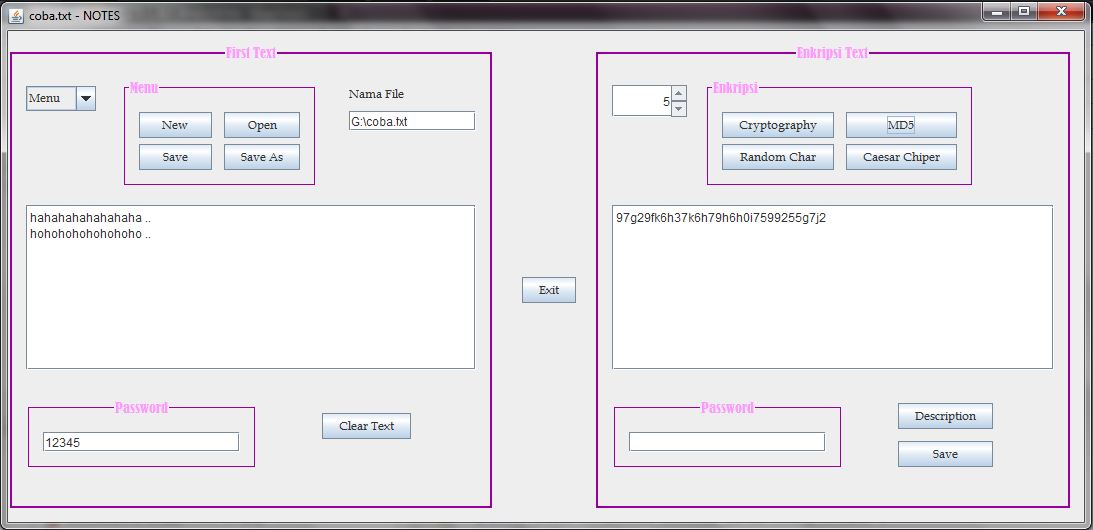
setelah itu coba kita enkripsi ..
bila sukses maka hasil enkripsinya akan seperti ini 


setelah itu kita diskripsikan ,, bila tidak dimasukkan password maka akan seperti ini

setelah diberi password tampilannya seperti ini


sekian dari saya ,, silahkan dicoba :)
READ MOREProject Stream IO